Building a learning management system (LMS) isn’t just about putting a video player on a website. Under the hood, you’re juggling heavy video streams, thousands of students taking tests at the exact same time, and strict data walls between different schools all while making sure nobody loses their progress.
An LMS is more than a course catalog with a video player. It is a coordinated set of services for identity management, content ingestion, enrollment, assessments, reporting, and integrations with external education platforms.
Right from day one, your setup needs to nail three ground rules:
- Lock down the walls: Every school only sees their own students, classes, and grades no cross-contamination.
- Stream without stutter: Videos, interactive modules, and course files have to load smoothly on any device, no matter how sketchy the Wi-Fi gets.
- Never lose a receipt: Quiz answers, assignment uploads, and completion checks have to log accurately, even when the system is glitching out or running behind the scenes.
These requirements shape the database, API design, background workers, storage infrastructure, and testing strategy. Get them wrong early, and the resulting system becomes expensive to maintain.
Also read: Medical Software Development Process
Core System Architecture & Database Design
Keep it simple and go with a modular monolith at the start. You can completely separate your UI, backend, database, file storage, and background workers without diving into a messy distributed setup before your team or user base actually needs it. Clear boundaries between modules give you all the room you need to scale later without the headache.
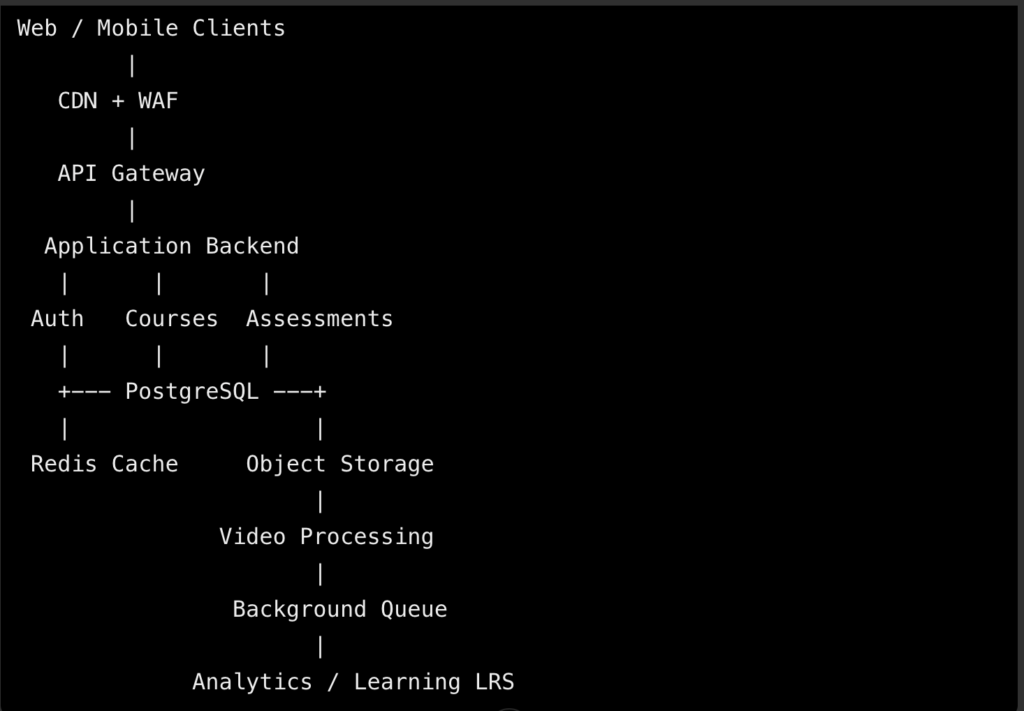
Don’t read too much into the flowchart. Just because boxes are drawn separately doesn’t mean you need to spin them up as independent microservices right out of the gate. For an MVP, you can keep things cozy by running your backend modules inside a single application while letting them share a managed PostgreSQL database and object storage.
Multi-Tenant SaaS Database Architecture
A multi-tenant LMS serves multiple institutions or organizations from a shared application. Each tenant may have its own learners, instructors, course catalog, branding, permissions, and reporting requirements.
There are three common isolation strategies.
| Architecture | How It Works | Advantages | Trade-Offs |
| Shared database and shared schema | Tenant-owned records share tables and include a tenant_id | Lower operational cost and straightforward migrations | Every query and authorization path must enforce tenant boundaries. |
| Shared database with schema per tenant | Each institution has a separate PostgreSQL schema | Stronger logical separation and tenant-specific organization | Migrations, schema management, and cross-tenant reporting become more complex. |
| Separate database per tenant | Each institution has its own database | Stronger isolation and more flexibility for enterprise requirements | Higher operating costs and more complex provisioning, monitoring, and backups. |
For many SaaS LMS products, a shared PostgreSQL database with tenant-scoped records and row-level security (RLS) is a practical starting point.
A simplified schema might look like this:
CREATE TABLE tenants (
id UUID PRIMARY KEY,
name TEXT NOT NULL,
created_at TIMESTAMPTZ NOT NULL DEFAULT now()
);
CREATE TABLE users (
id UUID PRIMARY KEY,
tenant_id UUID NOT NULL REFERENCES tenants(id),
email TEXT NOT NULL,
display_name TEXT NOT NULL,
created_at TIMESTAMPTZ NOT NULL DEFAULT now(),
UNIQUE (tenant_id, email),
UNIQUE (tenant_id, id)
);
CREATE TABLE courses (
id UUID PRIMARY KEY,
tenant_id UUID NOT NULL REFERENCES tenants(id),
title TEXT NOT NULL,
status TEXT NOT NULL DEFAULT ‘draft’,
created_at TIMESTAMPTZ NOT NULL DEFAULT now(),
UNIQUE (tenant_id, id)
);
CREATE TABLE enrollments (
id UUID PRIMARY KEY,
tenant_id UUID NOT NULL REFERENCES tenants(id),
course_id UUID NOT NULL,
user_id UUID NOT NULL,
enrolled_at TIMESTAMPTZ NOT NULL DEFAULT now(),
UNIQUE (tenant_id, course_id, user_id),
FOREIGN KEY (tenant_id, course_id)
REFERENCES courses (tenant_id, id),
FOREIGN KEY (tenant_id, user_id)
REFERENCES users (tenant_id, id)
);
CREATE INDEX idx_enrollments_user
ON enrollments (tenant_id, user_id);
CREATE INDEX idx_courses_status
ON courses (tenant_id, status);
This is a starting point, not a complete production schema. The composite foreign keys help prevent cross-tenant references between courses, users, and enrollments, while indexes support common tenant-scoped lookups.
Enforce PostgreSQL Row-Level Security
Row-level security lets PostgreSQL restrict which records a database role can read or modify. Application-level filters should still exist, but they must not be the only barrier separating institutional data.
For example:
ALTER TABLE courses ENABLE ROW LEVEL SECURITY;
ALTER TABLE courses FORCE ROW LEVEL SECURITY;
CREATE POLICY courses_tenant_isolation
ON courses
USING (
tenant_id = current_setting(‘app.tenant_id’, true)::uuid
)
WITH CHECK (
tenant_id = current_setting(‘app.tenant_id’, true)::uuid
);
The application must set the tenant context for each transaction using a trusted, authenticated identity, not a tenant ID supplied without verification by the client.
When using pooled database connections, always scope your settings with commands like SET LOCAL so a request doesn’t accidentally inherit leftover context from whatever ran right before it. Make sure your application’s database role isn’t bypassing Row-Level Security (RLS) under the hood, and always test how the system reacts when tenant context is completely missing or totally bogus.
Tenant isolation is a security boundary. Verify it with automated tests covering reads, inserts, updates, deletes, background jobs, exports, and administrative endpoints.
Also read: Web Development Best Practices
Role-Based Access Control (RBAC)
An LMS usually needs more than a simple administrator-versus-student distinction. Permissions should be modeled explicitly and checked on the server for every protected operation.
A typical role model includes:
- Platform administrator: Manages platform-wide configuration and operational settings.
- Tenant administrator: Manages users, courses, integrations, and policies for one institution.
- Instructor: Creates course content, grades work, and reviews learner progress.
- Teaching assistant: Supports designated courses with limited grading or moderation permissions.
- Student: Views enrolled courses, completes assessments, and reviews personal progress.
- Auditor or observer: Receives read-only access to specifically authorized records, where required.
Separate roles from resource-level permissions. An instructor may be allowed to edit a course they own but not another instructor’s course, even within the same tenant.
Use server-side authorization middleware for course ownership, enrollment checks, grade changes, and file access. Hiding buttons in the frontend is not an authorization control.
Core LMS Database Schema
The domain model should represent the complete learning workflow rather than only users and courses. A typical structure includes:
| Entity | Key Fields | Purpose |
| tenants | id, name, settings | Institutions and organizations |
| users | id, tenant_id, email, status | Learner and staff identities |
| roles / permissions | Role IDs, permission keys | Authorization policy |
| courses | id, tenant_id, title, status | Course catalog |
| modules | id, course_id, position | Course organization |
| lessons | id, module_id, content_type | Video, text, SCORM, or other learning content |
| enrollments | user_id, course_id, status | Learner access and enrollment history |
| assessments | id, lesson_id, assessment_type | Quizzes and assignments |
| quiz_attempts | user_id, assessment_id, score, submitted_at | Assessment history |
| grades | user_id, course_id, grade, graded_by | Final or current grade records |
| lesson_progress | user_id, lesson_id, completion_state | Learner progress |
| learning_events | actor_id, event_type, occurred_at | Activity and telemetry records |
| media_assets | id, storage_key, processing_status | Uploaded and processed media |
Include tenant ownership or an equivalent enforceable isolation relationship wherever tenant-scoped records are stored. Define deletion, retention, and audit requirements before deciding how long assessment and activity records should remain available.
Database Indexing and Transaction Design
Index the queries the application actually executes. Typical candidates include (tenant_id, course_id), (tenant_id, user_id), (tenant_id, status), and timestamp indexes for recent activity, but the right order depends on query predicates and sort operations.
Avoid indexing every column. Excessive indexes increase storage costs and slow writes, particularly when telemetry events arrive in large volumes.
Wrap critical operations like saving a quiz and instantly locking in the score inside a single database transaction so they either both happen or neither does. For background tasks, lean on idempotency keys and a transactional outbox pattern to make sure events don’t vanish into thin air right between saving to the database and kicking off queue jobs.
Redis can cache short-lived data such as course navigation, rate-limit counters, or frequently accessed configuration. Do not make Redis the authoritative store for grades, enrollment state, or final course completion.
Content Ingestion & E-Learning Standards (SCORM / xAPI)
LMS platforms often need to support content authored in external tools. Two important interoperability standards are SCORM and xAPI, but they solve different problems and should not be implemented as interchangeable formats.
Parsing SCORM Packages
SCORM packages commonly arrive as ZIP archives containing HTML, JavaScript, media assets, and a manifest named imsmanifest.xml. The manifest describes the package structure, launchable learning objects, and related metadata.
A safe ingestion pipeline should perform the following steps:
- Accept the upload through an authenticated endpoint.
- Store the original archive in private object storage.
- Validate the archive’s size, file count, paths, and supported package version.
- Extract files in an isolated worker environment.
- Parse imsmanifest.xml using a hardened XML parser.
- Validate launch paths and reject path traversal or unsupported references.
- Scan files according to the platform’s security policy.
- Store package metadata and publish the content only after validation succeeds.
Never dump a random zip file straight into your web server’s public folder. You’re practically asking for trouble, since malicious zips can hide path traversal traps, zip bombs that crash your server, sneaky executables, or sketchy configuration files.
Run parsing workers with restricted filesystem access, limited CPU and memory, timeouts, and no unnecessary network permissions. Disable dangerous XML features such as external entity resolution where applicable.
Also read: Why Immorpos35.3 Software Implementations Fail
Serving Interactive Learning Objects
A SCORM package may contain HTML5 and JavaScript that expects to communicate with a learning runtime. The LMS needs to expose the appropriate runtime interface and persist learner state, completion status, scores, and supported interactions.
Serve course packages from a completely separate domain or origin, and lock it down with tight Content Security Policies and iframe sandboxes. Walk a fine line here: if your sandbox is too loose, you leave a backdoor open, but if it’s too strict, you’ll accidentally break the interactive course content your students are trying to take.
The implementation should explicitly test:
- SCORM version compatibility.
- Launch and resume behavior.
- Completion and success status.
- Score reporting and lesson location.
- Suspend data and session termination.
- Browser refreshes and interrupted sessions.
- Duplicate or delayed completion events.
Do not assume every SCORM package follows the same conventions. Test against representative content exported from the authoring tools your customers actually use.
Tracking Learning Events with xAPI
Experience API (xAPI), often called Tin Can API, records learning experiences as structured statements. A typical statement follows an Actor–Verb–Object pattern, such as a learner completing a lesson or answering a question.
Example:
{
“actor”: {
“account”: {
“homePage”: “https://lms.example.com”,
“name”: “learner-123”
}
},
“verb”: {
“id”: “http://adlnet.gov/expapi/verbs/completed”,
“display”: {
“en-US”: “completed”
}
},
“object”: {
“id”: “https://lms.example.com/courses/safety/lessons/intro”
},
“timestamp”: “2026-10-13T00:00:00Z”
}
Just keep in mind this is just an example to point you in the right direction, not an out-of-the-box blueprint for every little xAPI requirement. In real life, you’ve got to follow whatever specific xAPI rules and Learning Record Store (LRS) guidelines your setup demands.
An LRS stores and exposes learning records. It can be part of the LMS or operate as a separate service, depending on interoperability requirements, event volume, and reporting needs.
Use asynchronous processing for high-volume telemetry. Validate event structure, authenticate producers, apply idempotency where supported, and define retention policies for learner identifiers and event history.
SCORM and xAPI Are Not the Same
| Capability | SCORM | xAPI |
| Main purpose | Packaging and runtime communication for e-learning content | Recording learning experiences across systems |
| Content format | Typically a package with a manifest and launchable files | Structured statements sent to an LRS |
| Runtime behavior | Content communicates with a SCORM API exposed by the LMS | Applications or learning activities emit xAPI statements |
| Offline or external activities | Depends on implementation and content | Can represent a wider range of experiences when correctly instrumented |
| Engineering requirement | Package validation, launch runtime, and state persistence | Statement validation, LRS integration, identity handling, and event processing |
Supporting both standards requires separate integration and test strategies. Avoid claiming compliance solely because a system can upload a ZIP file or store JSON events; verify the applicable specification and interoperability behavior.
Video Streaming & Media Infrastructure
Video delivery often becomes one of the most expensive and bandwidth-intensive parts of an LMS. A reliable design separates uploads, transcoding, storage, playback authorization, and content delivery.
Adaptive Bitrate Streaming
Do not serve a single large lecture file to every device and connection. Instead, process source recordings into adaptive bitrate streaming formats such as HLS or MPEG-DASH.
A typical pipeline works like this:
- The instructor uploads a source recording.
- The backend creates a media-processing job.
- A transcoding service generates multiple resolutions and bitrates.
- The service packages the output into streaming segments and a manifest.
- Processed assets are stored in private object storage.
- The LMS issues authorized playback access.
- A CDN delivers the video segments to the learner.
Adaptive bitrate streaming lets a smart video player automatically shift qualities on the fly as a student’s internet speed or connection quality dips and spikes. It’s a lifesaver for sketchy networks, but don’t expect it to magically save you from buffering if someone is on ancient Wi-Fi or your transcoding setup is completely botched.
For AWS-based infrastructure, services such as S3, CloudFront, and a managed transcoding service can form the foundation of the delivery pipeline. Comparable cloud platforms offer equivalent object storage, CDN, and media-processing capabilities.
Secure Content Delivery with Signed URLs
Store source recordings and protected course assets in private storage. Grant access through short-lived, authorized playback URLs or signed cookies rather than making the entire bucket publicly accessible.
When you’re dealing with AWS S3 and CloudFront, keep your media locked down tight by handing out signed URLs or signed cookies based on strict rules and expiration times. Always check if the user is actually allowed to watch the video before you hand over the keys, and set those links to expire fast enough that nobody can share or abuse them.
A secure delivery design should consider:
- Short-lived playback authorization.
- Tenant and enrollment checks before issuing access.
- Private origin access between the CDN and object storage.
- Rate limiting and monitoring for suspicious download patterns.
- Referrer and origin controls where appropriate, without treating them as standalone security boundaries.
- Key rotation and secure management of signing credentials.
Signed URLs reduce casual unauthorized access, but they do not prevent an authorized user from capturing a screen or redistributing content after receiving it.
DRM and Media Protection Limits
Digital rights management (DRM) may be necessary for premium content with licensing restrictions. Depending on supported browsers and devices, this may involve systems such as Widevine, FairPlay, or PlayReady, usually through a compatible packaging and playback workflow.
DRM adds licensing, compatibility, operational, and cost considerations. It is not a substitute for authentication, authorization, or secure storage, and it cannot guarantee that content will never be copied.
If you’re just starting out with a new LMS, keep it simple: lock your files behind private storage, hand out short-lived signed links, make sure users are actually enrolled, and set up basic monitoring.
Don’t waste time and sanity overcomplicating things with heavy-duty DRM until real-world client contracts or strict content licensing agreements actually force your hand.
Media Processing Reliability
Video encoding takes time, so don’t leave your HTTP requests hanging while a massive file transcodes in the background. Your upload endpoint should just validate the file, kick off the job, and instantly give the client a green light saying the upload is accepted.
Track media states such as uploaded, queued, processing, ready, and failed. Provide retry policies, dead-letter handling, operational alerts, and cleanup jobs for incomplete uploads or abandoned temporary assets.
Also read: How to Build Custom Software
LMS Architecture & Technology Stack Matrix
Choose technologies according to the team’s existing expertise, operational constraints, and projected workload. The following stack is a practical reference architecture, not a requirement to use every listed component.
| System Layer | Core Responsibility | Recommended Tech Stack | Primary Engineering Challenge | Scalability Consideration |
| Frontend Client | Course navigation, lessons, assessments, dashboards | React or Next.js with TypeScript | Accessible interfaces, player integration, and resilient client state | CDN-delivered static assets, route-level optimization, and controlled client-side caching |
| Backend API Core | Authentication, enrollment, courses, grading, permissions | Node.js with NestJS, or Python with Django/FastAPI | Enforcing tenant isolation and consistent domain rules | Stateless application instances, rate limits, horizontal scaling, and API versioning |
| Database & Storage | Relational records, files, and audit history | PostgreSQL, private S3-compatible object storage, Redis | Data integrity, RLS configuration, indexing, and backup recovery | Connection pooling, read replicas where appropriate, partitioning based on measured load |
| Video & Streaming | Transcoding, packaging, and authorized playback | HLS/DASH, managed transcoding, S3, CloudFront | Encoding latency, playback reliability, and content access control | CDN delivery, asynchronous processing, and storage lifecycle policies |
| Background Processing | SCORM ingestion, media jobs, reports, notifications | Celery with Redis/RabbitMQ, or BullMQ with Redis | Retry safety, idempotency, job isolation, and failure recovery | Worker concurrency limits, queue monitoring, autoscaling, and dead-letter handling |
Recommended Supporting Infrastructure
A production LMS also needs several supporting services:
- Identity provider: Managed authentication or a carefully implemented identity module supporting password recovery, MFA where required, and secure session handling.
- API gateway or edge layer: TLS termination, request limits, routing, and integration with a web application firewall.
- Observability: Centralized logs, metrics, distributed traces, and alerts for failed jobs or unusual authorization patterns.
- Secrets management: Managed storage for database credentials, API keys, and signing secrets.
- CI/CD pipeline: Automated tests, database migration checks, staged deployments, and rollback procedures.
- Backup and disaster recovery: Tested restoration procedures, documented recovery objectives, and monitoring for backup failures.
JSON Web Tokens are great for APIs, but don’t treat a token as a total security plan on its own. Check signatures, issuers, audiences, expiration dates, and intended usage; set reasonable lifespans, rotate your keys safely, and keep private student info out of the token claims.
For browser-based clients, assess whether secure, HttpOnly cookies or a backend-for-frontend design offers a safer session model than storing long-lived tokens in browser-accessible storage. Apply CSRF protections when cookie-based authentication is used, and configure CORS narrowly.
Gamification, Analytics, and Student Progress Tracking
An LMS needs a reliable way to calculate progress across lessons, assessments, and other learning activities. This becomes difficult when users watch videos on multiple devices, submit assessments asynchronously, or resume interrupted sessions.
Learning Analytics and Student Progress Telemetry
Track meaningful events rather than treating every browser interaction as a learning milestone. Useful event types may include:
- lesson_started
- video_progressed
- lesson_completed
- quiz_submitted
- assignment_submitted
- grade_published
- course_completed
Each event should include the relevant actor, tenant, course or lesson reference, event time, and unique event identifier. Avoid collecting more personal data than the learning and reporting requirements justify.
Spell out your finish line clearly right from the jump. One course might demand every single core module plus a passing grade on the final exam, while another might just need students to coast through a minimum percentage of the lessons to check the box.
Do not equate video watch time with learning. Playback telemetry can help explain engagement, but it does not prove attention or comprehension.
Event-Driven Processing and Asynchronous Queues
Use background queues for work that does not need to block the learner’s request. Common candidates include media transcoding, SCORM package extraction, report generation, notifications, and expensive grade calculations.
Celery is a common option in Python environments, while BullMQ can suit Node.js applications using Redis. Both require operational controls around retries, concurrency, failure handling, and duplicate delivery.
A robust event pipeline should:
- Validate the event at ingestion.
- Persist critical events durably before acknowledging them.
- Process downstream updates asynchronously.
- Make handlers idempotent so retries do not award duplicate points or create duplicate grades.
- Monitor queue depth, processing latency, and failed jobs.
For business-critical events, consider a transactional outbox pattern so database changes and event publication remain coordinated. Exactly-once processing is difficult to guarantee across distributed systems, so design for safe retries and deduplication.
Gamification Mechanics and Achievement Badges
Gamification can reward consistent participation, assessment completion, and course milestones. Examples include experience points, achievement badges, streaks, and completion certificates.
Define reward rules on the server. A browser should not be able to award itself points by submitting a forged request or replaying a lesson-completion event.
A simple badge engine can evaluate durable events against rules:
- Award a completion badge after all required course conditions are satisfied.
- Grant points for eligible activities using unique event IDs.
- Prevent repeated rewards for the same milestone.
- Keep an audit record of awards and revocations.
- Provide clear rules so learners understand how achievements are earned.
Gamification should support the learning objectives. If the system rewards raw watch time or repetitive clicks without meaningful constraints, learners may optimize for points rather than mastery.
Instructor Dashboards and Cohort Analytics
Teachers need a lightning-fast way to spot who’s falling behind without sitting around waiting for heavy, sluggish reports to drag across their screens. Keep tabs on the real deal metrics that matter: enrollment numbers, how fast people are actually finishing lessons, test scores, overdue assignments, and overall group engagement.
Do not run large aggregation queries on every dashboard request when event volume becomes substantial. Use indexed summary tables, materialized views, or asynchronously refreshed aggregates based on measured query latency and reporting freshness requirements.
A dashboard might show:
| Metric | Calculation | Engineering Note |
| Course completion | Completed enrollments divided by eligible enrollments | Define how withdrawals and incomplete enrollments are handled. |
| Assessment pass rate | Passing attempts divided by eligible graded attempts | Decide whether the metric uses first attempts or best attempts. |
| Lesson engagement | Eligible lesson interactions over a defined period | Avoid presenting activity as proof of comprehension. |
| Overdue submissions | Required submissions past their deadline | Use consistent time zones and deadline rules. |
| At-risk learners | A configurable combination of inactivity and incomplete required work | Treat the result as a review signal, not a definitive prediction of failure. |
For larger deployments, keep operational transactions separate from heavy analytics workloads. A dedicated reporting database or warehouse may be appropriate once dashboard queries begin competing with enrollment, grading, and course delivery.
Step-by-Step Implementation Roadmap for Development Teams
A disciplined implementation sequence reduces rework. The exact timeline depends on scope, integrations, compliance obligations, and the size of the engineering team.
Step 1: Define MVP Scope and Core Domain Models
Start with the minimum workflow needed to deliver a real course:
- Tenant and user provisioning.
- Authentication and role-based access control.
- Course and lesson creation.
- Enrollment and learner access.
- Video upload and playback.
- Basic quizzes and grading.
- Course completion tracking.
- Administrative audit logs.
Define the data model before building the interface around assumptions. Document tenant ownership, course publication states, enrollment transitions, assessment rules, and data-retention expectations.
Skip all the fancy bells and whistles like wild AI recommendations, crazy certificate builders, and endless integration standards for version one unless a paying client is holding a gun to your head. Launching a tight, rock-solid workflow beats rolling out a bloated, glitchy monster every single day.
Step 2: Build the Secure API Gateway and Role Engine
Implement authentication, request validation, and authorization before exposing administrative or learner data.
Use JWT authentication or a suitable session-based model, with secure API endpoints that validate both the caller’s identity and their access to the requested resource. Apply RBAC and tenant checks consistently across REST or GraphQL resolvers, file downloads, background jobs, and reporting endpoints.
Create automated tests for:
- Cross-tenant access attempts.
- Unauthorized grade changes.
- Access to unpublished courses.
- Enrollment checks on protected lessons.
- Expired or malformed authentication tokens.
- Rate limits and repeated login failures.
- Privilege escalation between instructor and tenant administrator roles.
A user who guesses another course’s ID must not gain access. Authorization must depend on verified permissions, not on the obscurity of resource identifiers.
Step 3: Integrate Media Pipelines and SCORM Parsers
Treat file uploads like a high-security checkpoint instead of just dumping everything straight into a public folder. Check the file metadata, slap strict size and type caps on it, stash the original files in private storage, and hand off the heavy lifting to isolated background workers.
For videos, integrate transcoding, HLS or DASH packaging, private asset storage, and signed playback access. For SCORM, implement archive validation, manifest parsing, isolated content serving, runtime communication, and persistence of learner state.
Set up your monitoring and metrics before your app ever touches live traffic. Keep a close eye on processing times, error types, queue delays, storage bloat, and video glitches so your team can spot and squash bugs on your own terms instead of waiting for angry users to tweet at you.
Step 4: Execute Load Testing and Security Audits
Test realistic workloads before launch. A useful load test should model concurrent course browsing, video playback, assessment submission, and telemetry ingestion rather than sending only generic API requests.
Measure:
- API response latency at different concurrency levels.
- Database connection utilization and slow queries.
- Queue depth and job processing delays.
- Media startup time and playback failure rates.
- Error rates during deployment or dependency failures.
- Recovery behavior after workers or application instances restart.
Use tools such as k6 or Locust for workload simulation, and include dependency-aware tests for database and queue bottlenecks.
Run security reviews covering tenant isolation, broken access control, file upload validation, secret handling, session security, and exposed storage. Validate backups by restoring them into a test environment; a successful backup job does not prove that recovery will work.
Step 5: Deploy, Monitor, and Improve
Roll out updates through staged staging environments using identical infrastructure blueprints and bulletproof database migrations. If your stack can handle it, lean on canary releases or gradual traffic shifts so you can catch nasty bugs on a tiny percentage of users before pushing updates live to everyone.
Establish service-level objectives for API availability, media processing, playback startup, and assessment submission. Set alerts for sustained failures rather than every isolated error, and define clear operational ownership for incidents.
After launch, use real usage data to guide architecture changes. Add read replicas, specialized analytics infrastructure, additional worker pools, or service boundaries only when measurements show a clear need.
Also read: Custom software development cost
Managing Perplexity and Burstiness in Technical Architecture Guides
Good tech docs need to find that sweet spot between being crystal-clear and actually readable. People love to throw around words like burstiness which just means shaking up your sentence length and structure and perplexity, which measures how predictable a text is to an AI model, but at the end of the day, neither one actually tells you if your code works or if your engineering is any good.
A strong architecture guide varies its rhythm without sacrificing accuracy. Short statements can emphasize operational requirements, while longer sentences can explain the relationships between database constraints, tenant context, asynchronous processing, and failure recovery.
For example:
Short: Never trust the client.
Longer: When an authenticated instructor submits a grade, the backend must validate the instructor’s tenant membership, course-level permission, enrollment context, and allowed grade transition before committing the change and publishing any downstream events.
The first sentence states a rule. The second makes the rule operational.
Mix up your sentence lengths to help people actually digest what you’re writing, not just to check off some fake numbers game. Real engineering street cred comes down to drawing exact system boundaries, nailing the gritty implementation details, owning your trade-offs, and game-planning for when things inevitably break—not just playing mad lib with your sentence structures to trick an algorithm.
Final Engineering Checklist
Before releasing an LMS to production, verify the critical controls.
- Tenant-scoped data access is enforced and tested.
- PostgreSQL RLS policies and application authorization work together.
- Course, lesson, enrollment, assessment, and grade relationships preserve data integrity.
- JWT or session-based authentication is configured securely.
- Protected media uses private storage and authorized delivery.
- Video transcoding and SCORM ingestion run through monitored background workers.
- Queue retries are safe, and duplicate events do not corrupt progress or rewards.
- xAPI and SCORM behavior is tested against the required interoperability targets.
- Learning analytics distinguish observed activity from actual mastery.
- Audit logs, monitoring, backups, and restoration procedures are operational.
- Load tests cover realistic concurrent learning and assessment workflows.
- Privacy, accessibility, retention, and applicable education-data obligations have been reviewed.
If you want to build a solid LMS that doesn’t collapse under its own weight, build the bedrock first: lock down your data boundaries and get your core learning loops working smoothly. Only after that should you start bolting on fancy extras like deep integrations, heavy analytics, or high-end media protection.
Keeping things modular, sticking to a clean database design, handling events reliably, and locking down your permissions will take you way further than chasing every shiny new tech trend on the market.